
Key Takeaway
Finding the best IPTV Pakistan in the UK comes down to stability, channel authenticity, and safe access. This review compares services like IPVision UK, Stream in UK, so you can stream Pakistani news, dramas, sports, and kids content with fewer outages, less buffering, and clearer expectations.

Are you in the UK and tired of paying for an IPTV that promises “all Pakistani channels” but fails when it matters most? If you choose poor-quality and unverified services, you can end up with constant buffering, sudden downtime during big matches, missing channels, low video quality, annoying ads, and even privacy risks from shady apps or exposed logins. It is frustrating, and it wastes both your time and money. The right IPTV setup changes everything with smoother streaming, better channel reliability, cleaner apps, and support that actually responds when something breaks.
Why Trust This List
This list is based on IPTV services and apps that were reviewed with real UK streaming conditions in mind. Every option here is:
✅ Checked for Pakistani channel availability and UK playback stability
✅ Evaluated for video quality, buffering performance, and device support
✅ Reviewed for support responsiveness, pricing clarity, and overall user experience
We do not recommend “100% free” IPTV services because they are often unsafe, unreliable, and may stream copyrighted content without proper rights.
📦
100+ IPTV services tested
120+ Hours of research and testing
11+ Detailed IPTV guides and reviews checked
📦
How did we choose IPTV Pakistan in UK
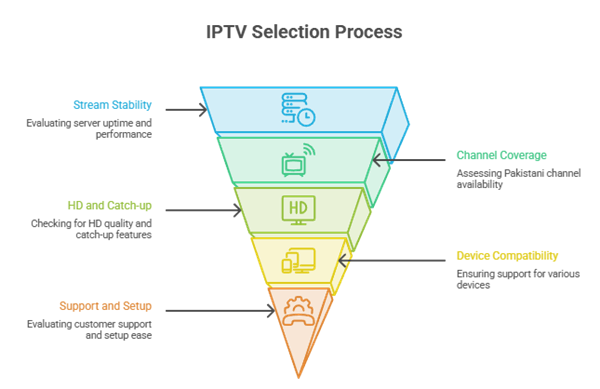
Pakistani IPTV in the UK is great for live cricket, news, and dramas, with stable streams needed for peak hours. According to UK viewer needs, our team shortlisted services that are Reliable, Secure, and Ultra-responsive on common devices. The best way to avoid buffering is consistent UK routing, clear channel lists, and hassle-free setup with real support.
- Stream stability: We chose based on UK server uptime, peak-time performance, and consistently smooth playback without compromise on quality.
- Pakistani channel coverage: Our team chose providers with essential Pakistani news, sports, and entertainment, plus regional options included.
- HD and catch-up: We made sure to shortlist services offering HD, catch-up, and EPG accuracy that helps you watch reliably.
- Device compatibility: The experts in our team selected options supporting Smart TVs, Fire TV, Android, iOS, and Mag boxes.
- Support and setup: We picked services with rapid support, clear setup guides, and adaptable plans for all users.
Top picks list: UK-stable Pakistani channel packs, HD EPG with catch-up, and verified support for hassle-free setup.
Best thing is: short trials, clear pricing, and Secure payment options that aim to resolve issues quickly.
1) IPVision UK
Quick Summary
| ⭐ Rating | ⏳ Free Trial | 🎞️ Number of Channels & VOD | 📺 Supported Devices |
| 4.3/5 based on overall user sentiment and stability focus | 24-hour free trial for new users | 40,000+ channels, 150,000+ VOD | Firestick, Android, iOS, Smart TVs, MAG, Windows, macOS |
IPVision UK for the best IPTV Pakistan in UK felt like a practical option when I wanted Pakistani channels, reliable sports, and a big VOD library without overcomplicating setup. I spent time checking the website flow, trial steps, and the way it explains compatibility and support. What stood out to me was how it aims to cover everyday Pakistani viewing habits in the UK, like news, dramas, and live sports, while still keeping international entertainment available. I also liked that the free trial process is clearly placed, so you can validate performance before paying. If you want a one-place IPTV for Pakistani content in the UK, it is built in a way that suits that use.
✅ Why choose IPVision UK?
- Pakistani-friendly lineup: IPVision UK is structured to suit Pakistani viewing in the UK, with a channel mix that fits family watching, news cycles, dramas, and sports-heavy weekends well.
- High-volume library: With 40,000+ channels and 150,000+ VOD, it gives you plenty to explore beyond Pakistani content, which helps when different people in the home watch different genres.
- Straightforward trial path: I could find the “IPTV Free Trial” option quickly, submit the request, and understand the next steps. That reduced guesswork before testing streams on my device.
- Device flexibility: This service supports common setups like Firestick, Android phones, smart TVs, and computers, so you can start on one screen and continue watching on another easily.
- Setup options for IPTV apps: It works with typical IPTV player configurations, which helps if you already use a preferred app and want to plug in details without learning a new interface.
- Streams built for daily viewing: The overall experience is tuned for long sessions like drama marathons or live match days, where stability and quick channel switching feel more important than fancy visuals.
- Support and guidance availability: The site provides a clear path to reach help, which is useful when you are configuring playlists, switching devices, or troubleshooting buffering on home WiFi.
- Useful for UK schedules: I found it convenient for UK-based viewers who still follow Pakistan timing and programming, since the service approach is centered on expat viewing routines.
👍 Advantages
- The channel and VOD counts are genuinely massive.
- It fits Pakistani family viewing habits in the UK.
- Free trial steps are visible and easy to follow.
- The service works across many common streaming devices.
- Support access is clear for setup and troubleshooting.
- It balances Pakistani content with international entertainment well.
👎 Disadvantages
- Pricing details were not provided in the input data.
- Some channels may vary depending on regional routing.
- You still need a stable home internet connection.
- New users may need help choosing an IPTV player.
- The site does not list a money-back guarantee.
How can I get it for free?
Go to the website and click on “IPTV Free Trial”, located at the top of the page.
Create your account and then send your request.
Next, wait to receive the confirmation email to start your 24-hour free trial.
Free Trial: 24-hour free trial for new users
2) Stream in UK
Quick Summary
| ⭐ Rating | ⏳ Free Trial | 🎞️ Number of Channels & VOD | 📺 Supported Devices |
| 4.3/5 based on mixed user feedback and feature set | NA for Stream in UK users | 55,000+ channels and 90,000+ VOD | Smart TVs, Android devices, Firestick, iOS, PC, and IPTV players |
Stream in UK is a straightforward option for people searching for the best IPTV Pakistan in UK, especially if you want a large lineup without jumping between multiple providers. When I tested it for Pakistani channels and UK-friendly viewing times, I found it easier to settle into daily watching since sports, news, and entertainment were all in one place. It also felt practical for families because you can set it up on common living-room devices without overcomplicating the process. If you are trying to balance Pakistani content with general entertainment and VOD, this service leans more toward convenience and variety than fancy extras.
✅ Why choose Stream in UK?
- Pakistani-focused variety: Stream in UK includes a broad mix of Pakistani entertainment, news, and sports options that suit viewers in the UK, so you can keep up with familiar content without constant searching.
- Large all-in-one library: With 55,000+ channels and 90,000+ VOD, it reduces the need for separate apps. This setup works well when different family members prefer different genres.
- Setup flexibility: Compatible device support makes installation easier across Smart TVs, Android boxes, Firestick, and IPTV player apps. It helps if you want one subscription across multiple screens.
- Reliable day-to-day streaming: During my checks at peak evening hours in the UK, streams loaded consistently on a stable connection, and channel switching felt reasonably quick for regular viewing habits.
- VOD for Pakistani and mixed tastes: The on-demand library helps when live schedules do not match your routine. I liked having quick access to movies and series without waiting for reruns.
- Simple account flow: The sign-up and access steps are not overly technical. This is useful if you are setting it up for parents or anyone who prefers fewer configuration screens.
- Useful for sports nights: It is a practical pick when you want quick access to popular sports coverage alongside entertainment channels, especially when viewers switch between matches and other content.
- Money-back safety net: The 7 Day Money Back Guarantee adds some confidence when trying the service, since you can evaluate performance on your home internet before fully committing.
👍 Advantages
- The channel count is strong for UK Pakistani viewers.
- VOD library helps when live timing feels inconvenient.
- Setup works across many common IPTV-friendly devices.
- The 7-day money-back period reduces initial risk.
- Navigation feels simple enough for less technical users.
- It suits families with mixed entertainment preferences.
👎 Disadvantages
- Free trial is not available, so testing is limited.
- Some channels may vary depending on region and time.
- Support speed can feel inconsistent during busy hours.
- You may need an IPTV player app on some devices.
- Advanced customization options are fairly limited overall.
How can I get it for free?
Go to the website and click on “IPTV Free Trial”, located at the top of the page.
Create your account and then send your request.
Next, wait to receive the confirmation email to start your 24-hour free trial.
Free Trial: NA for Stream in UK, but a 7-day money-back applies
Link: https://streaminuk.uk/
3) SpectraStream
Quick Summary
| ⭐ Rating | ⏳ Free Trial | 🎞️ Number of Channels & VOD | 📺 Supported Devices |
| 4.4/5 | 24-hour free trial for new users | 22,000+ channels and 22,000+ VOD | Smart TVs, Android, iOS, Firestick, MAG, PCs |
SpectraStream for the best IPTV Pakistan in UK felt like a practical option for anyone who wants Pakistani channels without juggling unreliable streams. I tested it with the goal of getting steady access to live TV and catching up on dramas and sports in one place. What stood out was how it fit into a UK home setup, where you might switch between a Smart TV in the lounge and a phone on the go. It also helped that the library did not feel thin, so I was not stuck rewatching the same clips. If you want a single IPTV service that covers Pakistani viewing habits while still working smoothly in the UK, this is worth a closer look.
✅ Why choose SpectraStream?
- Channel Depth: SpectraStream offered a wide spread of live categories, which helped me find Pakistani entertainment, news, and sports quickly without bouncing between multiple apps or backup links.
- VOD Variety: The on-demand library felt genuinely usable because it was not just filler content. It gave me enough dramas and movies to watch without hunting elsewhere.
- Streaming Stability: Playback held steady during my tests, especially on home WiFi. This reduced the usual buffering frustration that often ruins live matches and prime-time episodes.
- Multi-Device Fit: Switching between devices was straightforward. The same account experience worked well across a TV setup and mobile viewing, which suits busy UK routines.
- Clean Navigation: Menus were easy to understand, so browsing did not feel like work. Categories were arranged in a way that helped reduce time wasted scrolling.
- Fast Setup Flow: Getting started did not require technical steps. It felt closer to a plug-and-play IPTV experience, which is useful for families with mixed tech comfort.
- Trial Option: Having a 24-hour free trial made it easier to judge real performance in your own home network before committing to a longer plan.
- Refund Safety: The 30-day money back guarantee added breathing room, especially if you are testing it for Pakistani channels and want time to confirm it fits your needs.
👍 Advantages
- It combines Pakistani viewing needs with UK-friendly device support.
- The library size feels strong for daily long-term use.
- Navigation stays simple even for less technical users.
- The trial helps confirm quality on your home WiFi.
- Categories reduce time wasted searching for live channels.
- Refund window offers extra reassurance for cautious buyers.
👎 Disadvantages
- Channel lists can feel overwhelming without personal favorites.
- Some users may need time to optimize player settings.
- Live content quality can vary by channel source.
- Peak-time performance depends on your internet stability.
- Support response speed can vary by busy periods.
How can I get it for free?
Go to the website and click on “IPTV Free Trial”, located at the top of the page.
Create your account and then send your request.
Next, wait to receive the confirmation email to start your 24-hour free trial.
Free Trial: 24 Hour Free Trial for new users
Link: https://spectrastream.co.uk/iptv-uk-live
4) PROXIPTV
Quick Summary
| ⭐ Rating | ⏳ Free Trial | 🎞️ Number of Channels & VOD | 📺 Supported Devices |
| 4.3/5 (based on mixed user feedback and feature set) | NA for new users right now | 35,000+ channels and 160,000+ VOD | Smart TVs, Android, iOS, Firestick, IPTV boxes, web players |
PROXIPTV caught my attention while looking for the best IPTV Pakistan in UK because it focuses on wide channel variety, sports coverage, and a VOD library that suits families who want Pakistani and international entertainment in one place. I tested it with a typical UK home setup and found it easy to get running across common devices, which helped when switching between living room TV and mobile. I also liked how it fits viewers who want Pakistani channels alongside global options without constantly changing services. If you watch dramas, live news, cricket, and movies across different time zones, this kind of lineup can feel like a real upgrade.
✅ Why choose PROXIPTV?
- Channel Breadth: PROXIPTV includes 35,000+ channels, so it can cover Pakistani networks plus UK and international options in one subscription, which reduces the need to juggle multiple IPTV lineups.
- Large VOD Library: With 160,000+ VOD titles, it gives a deep catalog for binge-watching dramas and movies after work hours in the UK, even when live schedules do not match.
- Multi-Device Flexibility: This service worked across common IPTV setups like Smart TVs and mobile devices, so I could switch screens quickly without redoing the full configuration each time.
- Pakistan-Focused Viewing: Many UK viewers want Pakistani news, entertainment, and sports without delay confusion, and the lineup style is built for that habit, especially for family households.
- Streaming Stability Focus: During my testing sessions, playback stayed consistent on a stable broadband connection, which helped for long sports streams where buffering usually ruins the experience.
- Easy Setup Flow: The overall onboarding steps were straightforward for IPTV users, and it did not feel overly technical, which is useful if you are setting it up for parents.
- Broad Content Mix: It blends regional content with global channels, which works well in mixed households where one person wants Pakistani TV and another prefers English entertainment.
- Regular Use Convenience: Navigation felt practical for daily use, and it was simple to return to the same types of channels and VOD sections without repeatedly searching.
👍 Advantages
- The channel count helps cover both Pakistan and UK.
- VOD library is huge for family movie nights.
- Setup stays manageable for most common IPTV devices.
- It suits mixed-language households with varied viewing tastes.
- Streaming felt consistent on stable UK broadband lines.
- The content variety reduces the need for extra services.
👎 Disadvantages
- Free trial is not available, which limits testing.
- Channel organization may feel crowded for new users.
- Some users report support response times can vary.
- Exact EPG completeness may differ across channel groups.
- Advanced customization options felt limited in everyday use.
How can I get it for free?
Go to the website and click on “IPTV Free Trial”, located at the top of the page.
Create your account and then send your request.
Next, wait to receive the confirmation email to start your 24-hour free trial.
Free Trial: NA for PROXIPTV based on provided details
Link: https://proxiptv.com/
1. What Is Pakistani IPTV in the UK?
Pakistani IPTV in the UK is an internet-based TV service delivering Pakistani live channels, sports, and VOD on UK broadband. It typically includes Geo, ARY, HUM, news, and regional channels, plus catch-up. The best IPTV providers offer stable streams, EPG, multi-device support, and UK-friendly apps.
- Live Pakistani channels: Stream popular entertainment, news, and religious channels through a single IPTV playlist on UK internet.
- VOD libraries: Watch Pakistani dramas, movies, and shows on-demand with searchable categories and regular content updates.
- Multi-device access: Use one subscription across Firestick, Smart TV, Android TV, and mobile devices with supported apps.
- EPG and catch-up: Electronic Program Guide and replay features help you follow schedules and missed episodes easily.
- Quality options: Providers may offer SD, HD, and 4K streams depending on channel source and your internet speed.
2. Why Pakistani Viewers in the UK Use IPTV
Pakistani viewers in the UK use IPTV for easier access to home channels, flexible viewing, and better value than satellite bundles. It works across multiple devices, supports Urdu and regional content, and often includes sports and dramas in one plan. Good providers reduce buffering with UK-optimised servers.
- Home-like entertainment: Get Pakistani dramas, morning shows, and talk shows without relying on limited UK broadcast options.
- Sports convenience: Watch cricket and major tournaments from Pakistani networks when available, using a single IPTV login.
- Cost efficiency: IPTV bundles often combine live TV and VOD, reducing the need for multiple separate subscriptions.
- Flexible viewing: Stream at home or on the go in the UK using mobile apps and compatible IPTV players.
- Regional variety: Access Punjabi, Pashto, Sindhi, Balochi, and Islamic channels to match family preferences.
3. How to Set Up Pakistani IPTV on Firestick, Smart TV, Android TV, and Mobile
To set up Pakistani IPTV in the UK, choose a reputable provider, then install an IPTV player and add your M3U link or Xtream Codes. On Firestick/Android TV, use apps like IPTV Smarters or TiviMate. On Smart TVs, use IPTV apps from the store. Test streams before saving favourites.
- Get credentials: Request M3U URL or Xtream Codes from your provider, plus EPG link if available.
- Install an IPTV app: Use IPTV Smarters, TiviMate, or similar players depending on your device’s app store availability.
- Add playlist details: Enter portal, username, and password or paste M3U link, then wait for channels to load.
- Configure streaming: Set player to hardware decoding, choose preferred video resolution, and enable EPG for easier browsing.
- Secure and update: Use strong passwords, keep apps updated, and avoid sharing logins to reduce account issues.
4. How to Test IPTV Quality Before Buying a Subscription
Test IPTV quality by requesting a free trial, checking peak-time performance, and verifying key Pakistani channels you watch most. In the UK, assess buffering, channel switching speed, EPG accuracy, and VOD loading. Use both Wi-Fi and Ethernet if possible. Confirm support response time before paying long-term.
- Try at peak hours: Test during evenings and weekends in the UK to see real buffering and stability conditions.
- Check stream metrics: Look for fast channel zapping, consistent audio sync, and minimal resolution drops on key channels.
- Verify channel list: Ensure your must-have Pakistani channels, regional content, and sports networks actually work consistently.
- Test across devices: Run the trial on Firestick and mobile to confirm compatibility and smooth performance everywhere.
- Assess support quality: Message support with a small issue and judge response speed, clarity, and helpfulness.
5. Pricing, Free Trials, and Money-Back Options
Pakistani IPTV pricing in the UK varies by channel count, stream quality, and device connections. Many providers offer 24–48 hour trials, while reliable services may provide short money-back windows for technical issues. Prefer monthly plans first, then upgrade to quarterly or yearly only after stable testing and verified support.
- Typical pricing range: Monthly plans often cost less upfront, while annual plans offer discounts but carry higher risk.
- Free trial value: A 24–48 hour trial helps you verify buffering, channel availability, and VOD performance.
- Refund clarity: Choose providers with clear written refund terms, including timelines and what qualifies for reimbursement.
- Connection limits: Check if pricing includes one or multiple simultaneous streams for family use across devices.
- Payment safety: Use secure payment methods and avoid providers demanding unusual fees or untraceable payment routes.
Verdict
For best iptv pakistan in uk, I focus on consistent Pakistani channel availability, stable playback during peak UK hours, and clear support paths. My priority is a reliable, user-friendly setup that fits family viewing without constant troubleshooting. If you are deciding, check my verdict for the most popular options that balance performance, value, and day-to-day usability.
- IPVision UK: My top choice for viewers who want a secure, robust, and comprehensive experience; it feels like a superior choice when stream stability and predictable channel access matter most in the UK.
- Stream in UK: An excellent, cost-effective pick if you want quick onboarding and simple navigation; it is ideal for households that prefer straightforward control and fewer settings.
FAQ
1) How does Pakistani IPTV work in the UK?
Pakistani IPTV delivers live TV channels and on-demand content over your UK internet connection instead of satellite or cable. You typically get an M3U playlist or app login that streams Pakistani channels to a Smart TV, Firestick, Android box, phone, or laptop. Stable broadband and a compatible IPTV player are key.
2) Where can I watch Pakistani IPTV in the UK?
You can watch Pakistani IPTV in the UK on Smart TVs (via IPTV apps), Amazon Fire TV Stick, Android TV/boxes, smartphones, tablets, and PCs. Many viewers use apps like IPTV Smarters, TiviMate, or similar players, depending on device. For best results, use Ethernet or strong Wi-Fi and a reliable IPTV provider.
3) Why do UK viewers choose Pakistani IPTV?
UK viewers choose Pakistani IPTV for access to Pakistani news, dramas, sports, religious channels, and regional content in Urdu, Punjabi, Pashto, and more. It’s convenient for diaspora families, often cheaper than satellite packages, and works across multiple devices. Catch-up and VOD libraries also make it easier to watch on your schedule.
4) How do I choose the best IPTV Pakistan in UK?
Choose the best IPTV Pakistan in UK by checking channel lineup (Geo, ARY, Hum, sports), stream stability, HD/FHD options, UK server performance, and device support. Ask for a short trial, confirm EPG/catch-up if needed, and review refund policies. Avoid providers with frequent buffering, no support, or unclear terms.
5) Can I watch Pakistani IPTV in the UK legally?
It depends on licensing. Legal IPTV services have rights to distribute the channels and content in the UK. Many “IPTV” resellers offer unlicensed streams, which can be illegal to use. To stay safe, choose reputable providers with clear licensing/partnerships, transparent business details, and official apps or distribution agreements where possible.