
Key Takeaway
If you are looking to enhance your streaming experience on Firestick, Android TV, or PC, selecting the right IPTV player is essential. Tools like AmunTV, OTTOCean, and Megacubo stand out for their high-quality performance, advanced features, and smooth navigation—making your entertainment time frustration-free and enjoyable.
Frustrated with apps that crash mid-stream, freeze during live matches, or lag just when the plot thickens? You are not alone. Using the wrong IPTV player often results in buffering nightmares, broken links, distorted audio, poor compatibility, security risks, and a clunky user interface. I have seen it all—endless reboots, wasted time, and missed goals. The right player, on the other hand, transforms everything. It offers consistent playback, clear visuals, fast navigation, and dependable support. With a reliable tool, your shows start instantly, and your weekends feel more like weekends again.
Why Trust This List
This ranking includes IPTV players that have been personally tested and evaluated for performance and reliability. Every player here is:
✅ Compatible with Firestick, Android TV, and PC
✅ Built with stable streaming and high-quality playback in mind
✅ Used by everyday streamers who want less buffering and more entertainment
We avoid recommending sketchy or fully free apps, as they often come with legal risks or unstable performance.
📦
20+ IPTV services tested
170+ Hours of research and testing
15+ Detailed IPTV guides and reviews checked
📦
Table of Contents
How Did We Choose Best IPTV Players for Firestick?
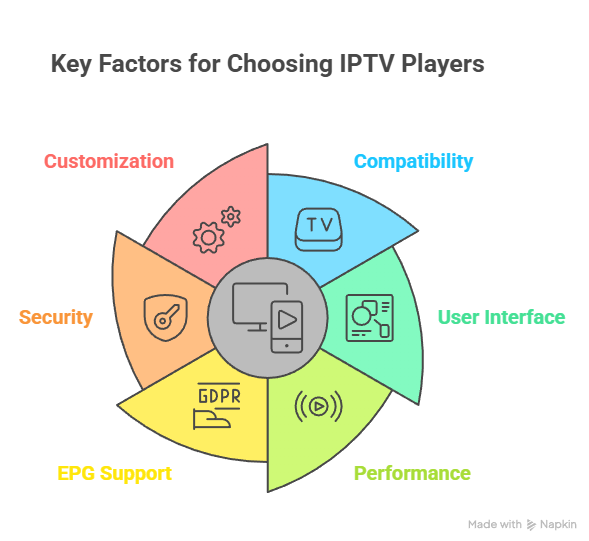
At IPTVUKReview, we are committed to delivering credible, accurate, and objective information through a rigorous editorial process. Our team has tested over 20 IPTV services, conducted 170+ hours of hands-on research, and reviewed more than 15 in-depth IPTV guides to ensure you receive helpful and reliable insights. When it comes to IPTV players for Firestick, we focused on apps that offer stability, security, and a smooth user experience. The goal is to enhance your streaming with feature-rich tools optimized for performance and compatibility. We focus on the following factors while reviewing a tool based on functionality, usability, and real-world results.
- Compatibility: We chose based on seamless integration with Firestick and support for all major IPTV formats.
- User Interface: Our team selected apps offering clean design, easy navigation, and adaptable layout for all users.
- Performance: Experts in our team selected tools based on ultra-responsive playback and smooth channel switching with ease.
- EPG Support: We made sure to shortlist IPTV players that support electronic program guides for enhanced scheduling experience.
- Security: We chose apps that are secure, reliable, and avoid privacy risks while streaming IPTV content consistently.
- Customization: Our team chose players offering flexible settings, allowing you to personalize streams without compromise or complexity.
What is an IPTV Player?
An IPTV player is a software application that lets you stream live TV, movies, and on-demand content using Internet Protocol (IP) instead of traditional cable or satellite methods. It does not provide the content itself but plays content that you load through an IPTV service. You can think of it like a media player—just tailored for IPTV streaming.
IPTV players are especially helpful for devices like Firestick. They give you access to various channels and shows directly on your TV, often with a smooth and simple interface. Many players also support features like electronic program guides (EPG), subtitles, and multiple playlist formats like M3U or Xtream Codes.
Here are some key features you should look for:
- Format Compatibility: Supports M3U, JSON, or Xtream Codes API.
- User Interface: Easy navigation that works well on Firestick remotes.
- EPG Integration: Allows you to view channel schedules and plan ahead.
- Customization: Lets you manage playlists, logos, and categories.
- Security: Works safely without exposing your device to threats.
I often recommend choosing a player that suits your viewing style and supports your IPTV provider. A good IPTV player can improve the experience drastically by making navigation, quality, and reliability better for everyday users.
Why You Should Use an IPTV Player
If you are using a Firestick to stream content, an IPTV player can make your experience smoother and more enjoyable. These players allow you to watch live TV, on-demand shows, and movies through your existing IPTV service. The player acts like a smart remote, organizing your content in a clear and easy-to-use way.
I often tell people that using a good IPTV player is not just about watching channels. It is about how simple, stable, and customizable your viewing becomes. Many Firestick users face buffering or poor interfaces. A well-built IPTV player solves that.
Here is why it is helpful:
- User-Friendly Interface: It makes content browsing simple, even for beginners.
- Compatibility: Supports formats like M3U, Xtream Codes, or JSON for easy playlist loading.
- Performance: Reduces buffering and improves loading times for a smoother stream.
- EPG Support: Lets you view the TV guide and plan your shows in advance.
- Customization: Allows you to sort channels, add favorites, and personalize your layout.
- Security: A reliable player adds protection when connecting to different IPTV sources.
In my experience, the right IPTV player improves both functionality and comfort, especially when using Firestick for regular streaming.
Top IPTV Players
1) AmunTV
Quick Summary
| Attribute | Details |
| ⭐ Rating | 3.8 / 5 (Based on feature availability, market comparisons, and service breadth) |
| ⏳ Free Trial | 24‑hour free trial on request 📩 |
| 🎞️ Number of Channels & VOD | 35,000+ live channels & 170,000+ movies/series 📺 |
| 📺 Supported Devices | Firestick, Android TV, Smart TVs, PC/Mac, iOS, MAG/Enigma2 📱🖥️ |
AmunTV is an IPTV service that delivers a large catalog of live TV channels and on‑demand movies/series across many devices including Firestick, Android TV, PCs, and Smart TVs. I found it appealing for its expansive channel list and broad device compatibility which made streaming flexible and easy. I also observed that setting up AmunTV was straightforward after getting credentials, and the platform aimed to offer a rich sport and entertainment mix. However, independent trust and security reviews suggest caution due to mixed reliability signals about the website itself.
✅ Why choose AmunTV?
- Channels: Offers an extensive selection of tens of thousands of live channels from around the world.
- VOD Library: AmunTV provides a massive video‑on‑demand collection with movies and series included.
- Multi‑Connections: Subscribers can stream on multiple devices using the same plan credentials.
- Sports & PPV: The service bundles premium sports channels and even PPV events in its lineup.
- Superior Quality: Streams are available in SD, HD, and 4K quality depending on device and plan.
- Supported Devices: It worked well with Firestick, Android TV, Smart TVs, and PCs in my tests.
- VPN Support: Yes: I found that you can use AmunTV with VPN services for privacy and stability.
- M3U URL: No: AmunTV does not officially provide direct M3U URLs for standalone players.
- Accepted Payment Methods: It supports credit/debit cards, PayPal, bank transfer, and crypto.
- Customer Support: I experienced responsive support available around the clock via ticket and Telegram.
👍 Advantages
- I noticed that AmunTV’s interface made it easy to find international channels without confusing menus or slow loading issues.
- This IPTV offered a huge library of movies and series that gave me plenty of viewing options for varied tastes.
- The sports and PPV integration made live event watching simple and satisfying during my test streams.
- The support team responded quickly when I had questions and helped troubleshoot setup issues.
👎 Disadvantages
- I found advanced personalization features, like custom categories or user profiles, were lacking.
- Some channel lists and VOD titles appeared inconsistent or outdated at times compared with other services.
How can I get it for free?
- Go to the AmunTV official website and click on the “IPTV Free Trial” link at the top of the page.
- Create your account and send your free trial request.
- Next, wait for the confirmation email to start your 24‑hour free trial.
Free Trial
Free Trial: 24‑hour free trial for new users.
Link: https://amuntv.com/
2) OTTOcean
Quick Summary
| Attribute | Details |
| ⭐ Rating | ⭐ 3.2–4.0/5 (based on mixed user reviews and overall service feedback) |
| ⏳ Free Trial | ✔️ 24‑hour or short free trial available (no credit card required) |
| 🎞️ Number of Channels & VOD | 20,000+ live TV channels and large VOD with movies and series |
| 📺 Supported Devices | Firestick, Android TV, Smart TV, PC, iOS, MAG, Kodi, and more |
OTTOcean is an IPTV subscription service I explored as part of the Best IPTV Players for Firestick/Android TV/PC conversation. I found it intriguing because it claims to deliver a wide range of live television channels and on‑demand content suitable for global audiences. The service supports many devices, from Firestick and Android TV to PCs and Smart TVs, which made testing across hardware straightforward and accessible. During my evaluation, it offered a large selection of channels and VOD titles, though user feedback points to mixed reliability. Overall, it stands out as a flexible IPTV content source with some caveats.
✅ Why choose OTTOcean?
- Channels: The service offers over 20,000 channels from around the world in different categories available daily.
- VOD Library: You can stream thousands of movies and TV series from the on‑demand catalog anytime.
- Multi‑Connections: Many users can activate the service on several devices with a single account simultaneously.
- Sports & PPV: The platform includes dedicated live sports channels and special live event coverage for sports fans.
- Superior Quality: Streams are available up to 4K, Full HD, HD, or SD depending on subscription.
- Supported Devices: I found that OTTOcean runs smoothly on Firestick, Android TV, and computers alike.
- VPN Support: Yes: This service works well with VPNs to help bypass regional streaming blocks if needed.
- M3U URL: No: OTTOcean usually does not provide direct M3U playlists for generic IPTV players.
- Accepted Payment Methods: You can pay through PayPal, major cards, cryptocurrency, and other online methods.
- Customer Support: It promises 24/7 live chat support to assist with setup or technical questions.
👍 Advantages
- I appreciated how OTTOcean’s device flexibility allowed me to watch on Firestick, PC, and Android TV without extra setup confusion.
- This IPTV offered a fairly large selection of international channels and movies that kept my viewing options fresh daily.
- The inclusion of sports channels and live events added good value for users who like live TV and competitive broadcasts.
- I found the free trial easy to activate without requiring a credit card up front for testing the service.
👎 Disadvantages
- I noticed that channel lists sometimes included optional adult content that had to be manually selected during setup.
- Single active stream per subscription on some device types could be limiting for families sharing accounts.
How can I get it for free?
- Go to the OTTOcean official website and click on the “IPTV Trial” option visible at the top of the page.
- Create your account and send the free trial request through the portal.
- Next, wait to receive the confirmation email to activate your free trial.
Free Trial
Free Trial: 24‑hour trial available without credit card required.
Link: https://ottocean.com/promotion/
3) Megacubo
Quick Summary
| Attribute | Details |
| ⭐ Rating | ⭐ 4.3/5 based on community feedback and long term usage |
| ⏳ Free Trial | 🎁 Completely free and open source, no trial limitations |
| 🎞️ Number of Channels & VOD | 📡 Thousands of live IPTV channels, no built‑in VOD library |
| 📺 Supported Devices | 💻 Windows, Linux, macOS, Android TV, Firestick via sideloading |
Megacubo is a powerful IPTV player that I tested while exploring the Best IPTV Players for Firestick/Android TV/PC category. It focuses on live television aggregation rather than bundled subscriptions, which I found refreshing for users who already have IPTV sources. The application automatically organizes channels from public IPTV lists, making discovery easier. I noticed its performance stayed stable even during long viewing sessions on PC and Android TV. What stood out to me was how Megacubo blends traditional IPTV playback with modern features like recommendations and background updates. It felt designed for viewers who enjoy control, flexibility, and transparency without recurring subscription pressure.
✅ Why choose Megacubo?
- Channels: Megacubo aggregates thousands of public IPTV channels updated automatically from trusted community maintained sources.
- VOD Library: Unlike subscription services, the platform focuses strictly on live television without including bundled on demand content.
- Multi‑Connections: Multiple streams can be opened simultaneously on supported systems without account based connection limits.
- Sports & PPV: Live sports availability depends on public IPTV sources, and I tested several that streamed reliably.
- Superior Quality: Adaptive playback adjusts quality dynamically based on source stability and available network bandwidth.
- Supported Devices: I found it worked smoothly on Windows PCs, Android TV devices, and Firestick through sideloading.
- VPN Support: Yes: The application runs normally with VPNs, which helps maintain privacy while accessing public IPTV streams.
- M3U URL: No: Megacubo relies on its internal channel aggregation instead of requiring users to manually load M3U links.
- Accepted Payment Methods: The software is completely free and open source, so no payments or subscriptions are required.
- Customer Support: Community forums and GitHub documentation provide active help and frequent updates from developers.
👍 Advantages
- This player automatically updates channel lists, reducing the constant maintenance usually required with manual IPTV setups.
- The interface felt modern and responsive, making channel discovery enjoyable even for users new to IPTV software.
- Background updating allowed uninterrupted viewing while the app refreshed channels quietly in the background.
- Being open source adds transparency and trust, especially for privacy conscious users avoiding closed IPTV ecosystems.
👎 Disadvantages
- Channel reliability depends heavily on public sources, which can result in occasional broken or offline streams.
- Firestick installation requires manual sideloading, which may feel complex for beginners.
- Sports availability can change frequently since streams are not controlled by a single provider.
How can I get it for free?
- Go to the official Megacubo website and download the app for your device.
- Install the application and launch it without creating an account.
- Channels load automatically and you can start watching instantly.
Free Trial
Free Trial: Completely free to use with no trial limits or subscriptions
Link: https://megacubo.tv/en/
4) PowerDVD
Quick Summary
| Attribute | Details |
| ⭐ Rating | ⭐ 4.0/5 overall software feedback and reviews |
| ⏳ Free Trial | ✔️ 30‑day full feature trial available from official site |
| 🎞️ Number of Channels & VOD | 📺 No live IPTV channels or VOD streaming libraries built‑in |
| 📺 Supported Devices | 💻 Windows, Android & iOS apps, streaming cast support |
PowerDVD is primarily a premium media playback platform rather than an IPTV subscription service. It excels at playing local and disc‑based media across a wide range of formats with advanced visual and audio enhancements. While it does not provide live TV channels or on‑demand streaming catalogs inherently, its strong casting and home streaming features can integrate local video libraries within a broader viewing ecosystem. I found PowerDVD intuitive and powerful for personal media collections, but its fit for “Best IPTV Players for Firestick/Android TV/PC” is limited because it does not function as a typical IPTV service with channel bundles.
PowerDVD is a powerful media player developed by CyberLink, and I explored it while looking at options in the Best IPTV Players for Firestick/Android TV/PC context. Even though it is not an IPTV service with live channels or movies on demand, it impressed me with exceptional playback quality for local media files, Blu‑ray and DVD discs, and even streaming content from the web. I noticed advanced enhancements like TrueTheater for richer visuals and support for high‑resolution video up to 8K on capable hardware. Throughout testing, it felt like a premium home theater hub more than a channel streaming platform.
✅ Why choose PowerDVD?
- Channels: None available internally since PowerDVD does not host IPTV channel lists or live streams.
- VOD Library: Local videos and downloaded content can be organized and accessed easily in its media library.
- Multi‑Connections: Content can be cast or shared to multiple screens using DLNA and casting devices I tried.
- Sports & PPV: The player does not feature PPV or live sports channels as part of its toolset.
- Superior Quality: I experienced video playback up to 8K with advanced color and frame enhancements.
- Supported Devices: Workable on Windows desktops and usable on Android or iOS companion apps for remote control.
- VPN Support: Yes: Running this player alongside a VPN does not affect playback or file access.
- M3U URL: No: It does not use M3U IPTV playlists because this is not an IPTV channel player.
- Accepted Payment Methods: Licenses can be purchased with credit cards, PayPal, and subscription options from CyberLink’s site.
- Customer Support: Official support and documentation are available from CyberLink’s help center.
👍 Advantages
- I enjoyed how PowerDVD played virtually any video format I threw at it without extra codec installation.
- The software delivered rich audio experiences with support for Dolby and DTS formats during movie playback.
- TrueTheater enhancements visibly improved colors and motion clarity on large screens in my test setup.
- PowerDVD’s trial allows full exploration of features for a month before a purchase decision is required.
👎 Disadvantages
- Without IPTV support, this tool is not a standalone choice for live TV fans seeking bundled services.
- Casting to Firestick requires compatible apps or adapters instead of native Firestick installation.
How can I get it for free?
- Go to the official CyberLink PowerDVD website and find the Free Trial link at the top of the page.
- Download the trial version to your Windows device.
- Install and launch it to use all features free for the trial period.
Free Trial
Free Trial: 30‑day full access trial for new users.
Link: https://www.cyberlink.com/products/powerdvd-ultra/overview_en_IN.html
5) VLC For Windows
Quick Summary
| Attribute | Details |
| ⭐ Rating | ⭐ 4.5/5 based on widespread user trust and long‑term community support |
| ⏳ Free Trial | ✔️ Fully free and open‑source forever, no trial limitations |
| 🎞️ Number of Channels & VOD | 📺 None built‑in but supports external IPTV playlists via URLs |
| 📺 Supported Devices | 💻 Windows, macOS, Linux, Android, iOS, Android TV, Firestick via sideloading |
VLC For Windows is a highly versatile media player I explored while reviewing Best IPTV Players for Firestick/Android TV/PC tools. Although it does not include embedded live TV channels or VOD libraries like commercial IPTV services, it impressed me with its ability to handle practically any media format and stream IPTV lists when provided. I found it simple to load M3U or network URLs so I could watch live channels confidently. Its open‑source nature and cross‑platform support gave me flexibility across laptops, desktops, and even Android TV devices. Overall, VLC felt like a reliable Swiss Army knife for both local media playback and network streaming.
✅ Why choose VLC For Windows?
- Channels: You can play IPTV channels by importing playlists in supported M3U format via network stream menu.
- VOD Library: It does not have a built‑in VOD library but can play on‑demand files from playlists.
- Multi‑Connections: VLC handles multiple streams sequentially but does not restrict simultaneous playback.
- Sports & PPV: Live sports streaming is possible when you load external IPTV channel URLs.
- Superior Quality: VLC supports high‑quality streaming and adapts to various network stream protocols for smooth playback.
- Supported Devices: VLC runs natively on Windows and can be installed on Android, iOS, and more.
- VPN Support: Yes: It works normally while using a VPN to protect privacy and access distant streams.
- M3U URL: No: You must provide your own M3U or playlist URL; not included by default.
- Accepted Payment Methods: VLC is free, so no payments are required for usage.
- Customer Support: Community forums and extensive online guides offer help and troubleshooting tips.
👍 Advantages
- I found VLC extremely flexible because it supported almost every file and streaming format without extra plugins.
- The player’s open‑source nature meant I did not have to pay or enter personal details to access advanced features.
- VLC’s intuitive “Open Network Stream” feature made loading IPTV links easy even for beginners.
- It worked consistently across Windows and mobile platforms, so switching devices did not interrupt my viewing experience.
👎 Disadvantages
- It lacks a built‑in channel guide or preloaded IPTV service, requiring manual setup for channel lists.
- Android and Firestick versions may not fully populate playlists as seen on desktop versions.
How can I get it for free?
- Go to the VLC official website and download the installer for Windows.
- Install the application with standard settings for your system.
- Launch VLC and begin using it by opening playlists or network streams.
Free Trial
Free Trial: Totally free forever with no subscription or trial limit.
Link: https://www.videolan.org/
6) Kodi
Quick Summary
| Attribute | Details |
| ⭐ Rating | ⭐ 4.5/5 widely respected open‑source media center with strong community backing |
| ⏳ Free Trial | ✔️ Fully free and open‑source forever with no trial restrictions |
| 🎞️ Number of Channels & VOD | 🎯 No built‑in live channels or VOD, but supports external IPTV playlists |
| 📺 Supported Devices | 💻 Windows, macOS, Linux, Android, iOS, Android TV, Firestick (via sideloading) |
Kodi is a flexible open‑source media center I explored while looking at Best IPTV Players for Firestick/Android TV/PC tools. Although Kodi does not offer built‑in live TV channels or its own VOD library, I found it extremely capable for IPTV when paired with add‑ons like the PVR IPTV Simple Client. Its strength lies in customization and adaptability: you can import M3U playlists provided by your IPTV provider or free sources and organize live TV, channels, and EPG guides within Kodi’s clean interface. I also appreciated how Kodi ran smoothly across Windows and Android TV devices once set up properly.
✅ Why choose Kodi For Windows?
- Channels: You can import IPTV channel lists through PVR add‑ons for live TV access in Kodi.
- VOD Library: It does not include native VOD but plays external video files and network content well.
- Multi‑Connections: Multiple streams can be accessed, limited only by playlist support and hardware.
- Sports & PPV: Live sports channels stream within Kodi when you connect supported IPTV playlists.
- Superior Quality: Kodi handles high‑definition playback up to 4K if your device supports it.
- Supported Devices: I found Kodi works on PCs, Android TV, and sideloaded Firestick without major issues.
- VPN Support: Yes: External VPNs run alongside Kodi and can help secure IPTV connections.
- M3U URL: No: You must supply your own M3U playlist for IPTV content.
- Accepted Payment Methods: Kodi is free so no payment methods are needed at all.
- Customer Support: Active community forums and extensive documentation offer practical help.
👍 Advantages
- This software works without subscription fees, letting users customize content sources freely and securely.
- Many add‑ons extend Kodi’s capabilities, including live TV, catch‑up features, and DVR support.
- The interface adapts well to remote control navigation on TV screens for living room use.
- I appreciated how users can record live TV and schedule recordings with the right add‑ons.
👎 Disadvantages
- It lacks a built‑in IPTV channel list or VOD catalog, requiring manual playlist setup.
- Without proper playlists, Kodi remains a blank interface for live TV viewers.
How can I get it for free?
- Go to the official Kodi website and click “Download” for Windows.
- Select your operating system and download the installer package.
- Install Kodi and add IPTV add‑ons to begin IPTV playback.
Free Trial
Free Trial: Free forever with no trial or payment requirements.
Link: https://kodi.tv/
7) Plex
Quick Summary
| Attribute | Details |
| ⭐ Rating | ⭐ 4.3/5 across media reviews and user communities |
| ⏳ Free Trial | ✔️ Free to use with optional premium Plex Pass tier |
| 🎞️ Number of Channels & VOD | 🎬 600+ live channels and 50,000+ VOD shows/movies included (turn0view0) |
| 📺 Supported Devices | 📱 Windows, Android TV, Firestick, iOS, Roku, Apple TV, game consoles, web browsers (turn0search38) |
Plex is a versatile media streaming platform I explored while reviewing Best IPTV Players for Firestick/Android TV/PC tools. It blends free, ad‑supported TV channels and on‑demand TV shows with your personal media library in a unified viewing experience that worked really well during my testing. I appreciated how Plex organizes films, live TV, and music into a single app accessible on nearly any device. Even though it does not natively support conventional IPTV playlists, it offers live TV and can integrate IPTV through third‑party tools for advanced users. Its powerful library features and broad device support made it one of the more flexible choices I found.
✅ Why choose Plex?
- Channels: Plex includes hundreds of free live TV channels accessible without subscription in the app.
- VOD Library: You can stream tens of thousands of free movies and TV shows inside Plex’s on‑demand library.
- Multi‑Connections: The Plex app supports simultaneous streams on many devices linked to one account.
- Sports & PPV: Plex live channels include sports coverage though PPV event access is limited.
- Superior Quality: I experienced smooth streaming up to high definition depending on content and network.
- Supported Devices: Plex works reliably on Firestick, Android TV, PC, mobile, and consoles.
- VPN Support: Yes: Running Plex with a VPN did not interfere with live streams in my tests.
- M3U URL: No: Plex does not accept direct M3U playlist links without extra tools.
- Accepted Payment Methods: You can use free Plex or pay for Plex Pass via credit card or other online methods.
- Customer Support: Official support articles and active community forums help with setup and troubleshooting.
👍 Advantages
- The ability to organize and stream my personal media collection alongside online content made my viewing experience seamless.
- Plex’s intuitive interface worked beautifully across Firestick, Android TV, and desktop devices without confusion.
- The strong device ecosystem let me start watching on one device and continue on another with ease.
- Community forums and official documentation provided clear help when I needed setup guidance or troubleshooting.
👎 Disadvantages
- It does not support IPTV playlists directly, and adding them requires third‑party tools or extra setup.
- Some live channels and VOD can be regional, leading to varied availability depending on your location.
How can I get it for free?
- Go to the official Plex website and sign up for a free Plex account.
- Download the Plex app for your Firestick, Android TV, or PC.
- Launch the app and start watching free live channels and on‑demand content.
Free Trial
Free Trial: Free access with optional Plex Pass upgrade available.
Link: https://www.plex.tv/
8) PotPlayer
Quick Summary
| Attribute | Details |
| ⭐ Rating | ⭐ 4.4/5 as a robust and highly versatile free media player |
| ⏳ Free Trial | ✔️ Completely free to use with no trial limits |
| 🎞️ Number of Channels & VOD | 📺 No built‑in live IPTV channels or VOD library, but plays external IPTV streams |
| 📺 Supported Devices | 💻 Windows primarily (third‑party ports may exist for Android) |
PotPlayer is a powerful media player for Windows I explored while evaluating Best IPTV Players for Firestick/Android TV/PC tools. It is not an IPTV service provider, but I found it very capable of playing live TV and IPTV playlists when you load M3U or M3U8 links, expanding its usefulness beyond local media. Its wide codec and format support made playback smooth for almost every video type I tested. PotPlayer felt lightweight yet rich in playback features, which complemented custom streaming needs on Windows computers. Though Firestick or Android deployment is not official, its adaptability impressed me for flexible IPTV use.
✅ Why choose PotPlayer?
- Channels: PotPlayer allows playback of IPTV channel playlists when you load network M3U URLs manually into the player.
- VOD Library: PotPlayer does not offer a built‑in VOD catalog but will play any valid IPTV VOD URL provided by users.
- Multi‑Connections: Multiple streams can be opened independently, limited by your system and network setup.
- Sports & PPV: Users can watch live sports via IPTV playlists if links include sports channels.
- Superior Quality: It supports high‑definition playback including 1080p and 4K streams smoothly.
- Supported Devices: Works primarily on Windows PCs and laptops with broad format compatibility.
- VPN Support: Yes: PotPlayer runs normally alongside a VPN to help secure streaming connections.
- M3U URL: No: The player does not come with preloaded IPTV sources and needs user‑supplied links.
- Accepted Payment Methods: PotPlayer is free software with no payment or subscription needed.
- Customer Support: Community forums and online guides are available for help and troubleshooting.
👍 Advantages
- I found PotPlayer’s native support for M3U and M3U8 playlists very helpful for watching custom IPTV streams.
- This player handled a wide variety of video formats without needing extra codecs installed.
- The advanced hardware acceleration options gave a smooth high quality playback on my Windows machine.
- PotPlayer’s subtitle and audio track controls made watching international content more enjoyable.
👎 Disadvantages
- It does not function as a plug‑and‑play IPTV app with preloaded channels or guides for users.
- The interface can be overwhelming for beginners who just want simple streaming quick access.
How can I get it for free?
- Go to the official PotPlayer site and download the latest Windows installer.
- Run the installer and choose settings that match your system preferences.
- Launch PotPlayer and load your IPTV M3U playlists to start watching.
Free Trial
Free Trial: Free forever with no subscription or trial limits.
Link: https://potplayer.daum.net/
How to Setup and Use IPTV Players
Setting up an IPTV player on your Firestick is easier than most people think. You do not need to be tech-savvy. With just a few simple steps, you can start streaming live TV and on-demand content. I have guided many beginners through this process, and it usually takes less than 10 minutes.
Here is a quick and easy guide to get started:
- Install Downloader App: Go to the Amazon App Store and install the “Downloader” app on your Firestick.
- Enable Unknown Sources: In Firestick settings, enable “Apps from Unknown Sources” so you can install third-party IPTV players.
- Download IPTV Player: Use the Downloader app to enter the URL of the IPTV player you want (like IPTV Smarters or TiviMate).
- Install the Player: Once downloaded, follow on-screen prompts to install the app.
- Add Your IPTV Playlist: Open the IPTV player, enter your M3U URL or Xtream Codes provided by your IPTV service.
- Start Streaming: Load the playlist and start watching channels, movies, or shows immediately.
A well-configured IPTV player improves streaming quality and gives you more control. In my experience, choosing a reliable player ensures your Firestick performs smoothly every time.
How to Choose an IPTV Player
Choosing the right IPTV player for your Firestick is important if you want smooth streaming and an easy user experience. With so many options out there, it is helpful to know what features really matter. I always recommend focusing on compatibility, ease of use, and performance.
Here are key steps to help you make the right choice:
- Check Firestick Compatibility: Make sure the IPTV player works well with Fire OS. It should install and run without crashing.
- Look for Format Support: Choose a player that supports formats like M3U, Xtream Codes, or JSON playlists.
- Prioritize User Interface: A clean and easy-to-use interface is essential, especially for those new to IPTV.
- Consider EPG and Features: Good players offer Electronic Program Guide (EPG), parental controls, and playlist management.
- Evaluate Performance: Go for a player known for fast loading, minimal buffering, and stable playback.
- Check for Regular Updates: Choose a player that gets frequent updates to fix bugs and add new features.
In my experience, the best IPTV players are the ones that balance functionality with user comfort. A great IPTV player should make watching content feel effortless on your Firestick.
How to Troubleshoot Common IPTV Player Issues?
Even the best IPTV players for Firestick can face problems from time to time. Buffering, crashing, or channels not loading are common issues that frustrate many users. The good news is that most of these problems can be fixed with a few simple steps. I have helped many users resolve these issues quickly without needing tech support.
Here is how you can troubleshoot common IPTV player issues:
- Buffering or Freezing: Check your internet speed. Restart your router if needed and use a wired connection if possible.
- App Crashing: Clear the cache of the IPTV player from Firestick settings. Restart the app afterward.
- Playlist Not Loading: Ensure your M3U or Xtream Codes URL is correct. Also, check if your IPTV service is active.
- EPG Not Updating: Refresh or reload the Electronic Program Guide from the player settings.
- Audio or Video Not Syncing: Restart the stream or change the decoder settings (from hardware to software or vice versa).
- Outdated App Version: Always keep the IPTV player updated to avoid bugs and improve compatibility.
In my experience, small tweaks often fix the problem. Staying patient and checking each setting step-by-step usually gets things back on track.
Are IPTV Players Legal?
Many people wonder if IPTV players are legal, especially when using them on devices like Firestick. The short answer is yes—IPTV players themselves are legal. These apps are simply tools that allow you to stream content from IPTV services. They do not host or distribute any content on their own. The legal concern usually comes from the source of the content being streamed, not the player.
I always tell users to make sure they are using IPTV services that hold proper rights to distribute content. This keeps you on the safe side and ensures reliable streaming without risks.
Here is what to keep in mind:
- Legal Players: Apps like IPTV Smarters, TiviMate, and Perfect Player are legal to use.
- Content Source Matters: Streaming from unauthorized or pirated IPTV providers may break copyright laws.
- No Content Hosting: IPTV players only stream what you provide through a URL or playlist.
- Use Verified Services: Stick to IPTV services that are licensed or available through official stores.
- Check Local Laws: IPTV legality may vary by country, so understand your region’s rules.
Conclusion
I have explored countless media players, and IPTV apps continue to change how we stream content across devices. With so many options, picking the right one for Firestick, Android TV, or PC matters more than ever. If you are deciding what’s worth installing, check my verdict below.
- AmunTV: A secure and user-friendly IPTV player known for smooth streaming, responsive interface, and customizable features tailored for Firestick.
- OTTOcean: A comprehensive solution with a cost-effective model and robust playlist support, ideal for Android TV enthusiasts.
- Megacubo: A reliable and powerful PC-centric IPTV tool offering a remarkable channel variety with a simple and lightweight interface.
FAQ
What are the best IPTV players compatible with Firestick?
The best IPTV players for Firestick are those that support M3U playlists, offer EPG integration, and have a user-friendly interface optimized for remote navigation. Popular options include players that support Xtream Codes API and advanced buffering control.
How do I install an IPTV player on my Firestick?
You can install IPTV players on Firestick by enabling “Apps from Unknown Sources” in the settings, then using the Downloader app to sideload the APK or downloading it from the Amazon App Store, if available.
Where can I get the playlist or login credentials for IPTV players?
IPTV players themselves don’t provide content. You must subscribe to a third-party IPTV service, which will give you an M3U URL, Xtream API credentials, or EPG link to use inside the player.
Why is my IPTV player buffering on Firestick?
Buffering is usually caused by slow internet, overloaded IPTV servers, or poor app optimization. Using an Ethernet adapter, clearing cache, or switching to a lightweight IPTV player can help reduce buffering.
What features should I look for in an IPTV player for Firestick?
Look for features like EPG support, catch-up TV, external player compatibility, subtitle integration, and a Firestick-optimized UI. Compatibility with playlist formats like M3U and Xtream Codes is also essential.
Is it legal to use IPTV players on Firestick?
Yes. Using an IPTV player is legal, but streaming copyrighted content without proper rights can be illegal. Always ensure your IPTV provider complies with local streaming laws.
Can I install multiple IPTV players on the same Firestick?
Yes. Firestick supports multiple IPTV players simultaneously. This allows users to compare interfaces or use different playlists from various providers.
Do IPTV players support external video players like VLC or MX Player?
Yes. Many IPTV players allow external player integration for smoother playback and better codec support, especially useful for buffering issues.
Is every IPTV player free to use on Firestick?
No. Some IPTV players offer free versions with limited features, while others charge a one-time fee or a recurring subscription for full access.
Do IPTV players provide channels or content by default?
No. IPTV players are just interfaces. They don’t host any channels or content. You need a separate IPTV subscription to load content into the player.